Originally written in French. Translated by AI — the meaning has been preserved, not the prose.
Graphify is a tool built to map code by paying an AI to read every file. I repurposed it to map my knowledge wiki, with no AI and no API key. A single 160-line Python file, 0.2 seconds of computation, and a thousand notes become a graph you can explore, query and walk through.
A thousand notes on marketing. Atomic notes, glossary definitions, reading maps for each book. All linked to one another, and every link explains why it exists.
And yet there was no way to see the overall shape. No simple way to answer questions like: what connects Cialdini's reciprocity to churn in a SaaS business? Which notes sit at the heart of the theme, and which are isolated?
Obsidian's graph view shows a ball of yarn. Pretty, but silent.
This article describes how I got a usable graph of this wiki by repurposing Graphify, a tool designed for code, and what that graph taught me about my own knowledge base.
The starting point: a wiki where links carry meaning
I have already explained why I built a knowledge base maintained by an AI. The principle: I give books and documents to Claude, which extracts atomic notes, glossary entries and other kinds of cards from them, then links them together.
One rule matters more than all the others for what follows: a link must never be decorative. Every link is followed by a short sentence that explains the relation.
- [[GLO00614-marche-minimal-viable]] — the MVMarket is the strategy
  for crossing the chasm, not the chasm itself.
- [[GLO00619-technology-adoption-life-cycle]] — the framework in which
  the chasm sits.
In other words, the relations between ideas are already written down, in black and white, inside the notes. That detail is what makes everything else possible.
What is Graphify?
Graphify turns a folder of code or documents into a knowledge graph, which you can then query from an assistant such as Claude Code.
It works in two stages.
- The build. Graphify has an AI read every file and infer the important elements and the relations between them. This is the expensive step: it consumes tokens, and the result varies from one run to the next.
- The exploration. Once the graph is built, Graphify splits it into groups of closely related nodes, generates an interactive map and a report, and answers questions: what are the connections of a given element, which path leads from A to B.
The idea behind the repurposing
On a code repository, the build step makes sense: nobody has written down that one function calls another, so it has to be inferred.
On my wiki, it is the other way round. The AI would have nothing to infer. The relations are already there, written by hand or validated at ingestion time. Paying an AI to rediscover them would be expensive, slow, and less faithful than what is already written.
So I replaced the build step with a small homemade script and kept everything else in Graphify.
Wiki notes (.md)
      │
      │  custom script: reads the [[...]] links and their explanation
      ▼
graph.json  (standard NetworkX format)
      │
      │  Graphify: groups, map, report, questions
      ▼
graph.html · GRAPH_REPORT.md · explain · path · query
What makes the repurposing possible: Graphify accepts any graph in the standard format of the NetworkX library. It does not check where that graph came from. You just have to hand it over.
Under the hood: a single file
The script does three things.
1. Inventory the notes. Each Markdown file becomes a node. Its identifier is the file name, and its type is derived from the prefix: ATO for an atomic note, GLO for the glossary, MOC for a reading map, and so on.
2. Find the links. A regular expression finds every [[ID-slug]] in the text. If the target note exists, a link is created.
3. Name the relation. The text written after the dash that follows the link becomes the name of the relation. This is what lets Graphify display "the MVMarket is the strategy for crossing the chasm" rather than a bare "link".
for line in text.splitlines():
    matches = LINK_RE.findall(line)
    relation_match = re.search(r"\]\]\s*[—-]+\s*(.+)", line)
    relation = relation_match.group(1).strip()[:80] if relation_match else "links"
No library to install: the script only uses modules that ship with Python. Here is the full file.
"""
Build graph.json from Obsidian [[links]] in wiki notes — no LLM needed.
Output format: NetworkX node_link_graph (compatible with graphify path/explain/query).

Usage:
    .venv/bin/python scripts/build_graph.py [--theme maintenance] [--output _GRAPHITY/]
"""

import argparse
import json
import re
import uuid
from pathlib import Path

WIKI_ROOT = Path(__file__).resolve().parent.parent.parent.parent / "wiki"
LINK_RE = re.compile(r"\[\[([A-Z]{2,3}\d{5}-[^\]\|]+?)(?:\|[^\]]*)?\]\]")
FRONTMATTER_RE = re.compile(r"^---\n(.*?)\n---", re.DOTALL)

TYPE_MAP = {
    "ATO": "atomic_note",
    "GLO": "glossary_term",
    "NOR": "norm_reference",
    "EXN": "normative_requirement",
    "PRO": "business_process",
    "OBJ": "domain_object",
    "BRL": "business_rule",
    "REG": "regulatory_text",
    "HAB": "habilitation",
    "IND": "indicator",
    "MOC": "moc",
    "SRC": "source_record",
}


def parse_frontmatter(text: str) -> dict:
    m = FRONTMATTER_RE.match(text)
    if not m:
        return {}
    result = {}
    for line in m.group(1).splitlines():
        if ":" in line:
            k, _, v = line.partition(":")
            result[k.strip()] = v.strip().strip('"')
    return result


def slug_to_id(slug: str) -> str:
    """Extract the ID prefix (e.g. 'ATO00001') from a slug like 'ATO00001-some-title'."""
    parts = slug.split("-", 1)
    return parts[0].upper()


def build_graph(theme: str, output_dir: Path) -> dict:
    notes_root = WIKI_ROOT / "themes" / theme / "notes"
    if not notes_root.exists():
        raise SystemExit(f"Notes directory not found: {notes_root}")

    nodes = {}   # node_id -> node dict
    edges = []   # list of {source, target, relation}

    md_files = list(notes_root.rglob("*.md"))
    md_files = [f for f in md_files if f.name != "README.md"]

    # Index: slug -> node_id (file stem without extension)
    slug_index = {}
    for f in md_files:
        stem = f.stem  # e.g. ATO00001-some-title
        slug_index[stem] = stem
        # Also index by bare ID (ATO00001) for robustness
        bare_id = stem.split("-")[0]
        slug_index.setdefault(bare_id, stem)

    print(f"[build_graph] {len(md_files)} notes found in {notes_root}")

    for f in md_files:
        text = f.read_text(encoding="utf-8")
        fm = parse_frontmatter(text)

        node_id = f.stem
        prefix = node_id[:3].upper()
        node_type = TYPE_MAP.get(prefix, "note")
        title = fm.get("title") or fm.get("term") or fm.get("name") or node_id
        subdir = f.parent.name  # e.g. "atomiques", "glossaire"

        nodes[node_id] = {
            "id": node_id,
            # label = slug so graphify path/explain resolve by ID (e.g. "ATO00001-...")
            "label": node_id,
            "title": title,
            # norm_label includes slug tokens for fuzzy matching
            "norm_label": node_id.lower().replace("-", " "),
            "type": node_type,
            "kind": node_type,
            "source_file": str(f.relative_to(WIKI_ROOT.parent)),
            "subdir": subdir,
            "status": fm.get("status", "draft"),
            "uid": fm.get("uid") or str(uuid.uuid4()),
            "wiki_id": fm.get("id", ""),
        }

    # Second pass: extract links
    seen_edges = set()
    for f in md_files:
        text = f.read_text(encoding="utf-8")
        source_id = f.stem

        # Extract label from link context line (text after — )
        for line in text.splitlines():
            matches = LINK_RE.findall(line)
            # Extract relation label from "— relation text" after the link
            relation_match = re.search(r"\]\]\s*[—-]+\s*(.+)", line)
            relation = relation_match.group(1).strip()[:80] if relation_match else "links"

            for slug in matches:
                # Resolve target
                target_id = slug_index.get(slug) or slug_index.get(slug.split("-")[0])
                if not target_id or target_id == source_id:
                    continue
                if target_id not in nodes:
                    continue
                key = (source_id, target_id)
                if key in seen_edges:
                    continue
                seen_edges.add(key)
                edges.append({
                    "source": source_id,
                    "target": target_id,
                    "relation": relation,
                    "key": 0,
                })

    node_list = list(nodes.values())

    graph_data = {
        "directed": True,
        "multigraph": False,
        "graph": {"theme": theme},
        "nodes": node_list,
        "links": edges,
    }

    output_dir.mkdir(parents=True, exist_ok=True)
    graph_path = output_dir / "graph.json"
    graph_path.write_text(json.dumps(graph_data, ensure_ascii=False, indent=2), encoding="utf-8")

    print(f"[build_graph] {len(node_list)} nodes, {len(edges)} edges")
    print(f"[build_graph] graph.json → {graph_path}")
    return graph_data


if __name__ == "__main__":
    parser = argparse.ArgumentParser()
    parser.add_argument("--theme", default="maintenance")
    parser.add_argument("--output", default="_GRAPHITY/")
    args = parser.parse_args()

    build_graph(args.theme, Path(args.output) / args.theme)
What it looks like on the marketing theme
The marketing theme of my wiki is fed by some twenty books: Dunford, Seth Godin, Cialdini, Moore, Ries and Trout, Nagle, Byron Sharp, Rob Fitzpatrick…
| Measure | Value |
|---|---|
| Notes | 1,013 |
| Links | 6,442 |
| Groups of notes detected | 22 |
| Time to build the graph | 0.2 seconds |
| AI tokens consumed | 0 |
The map and its groups of notes
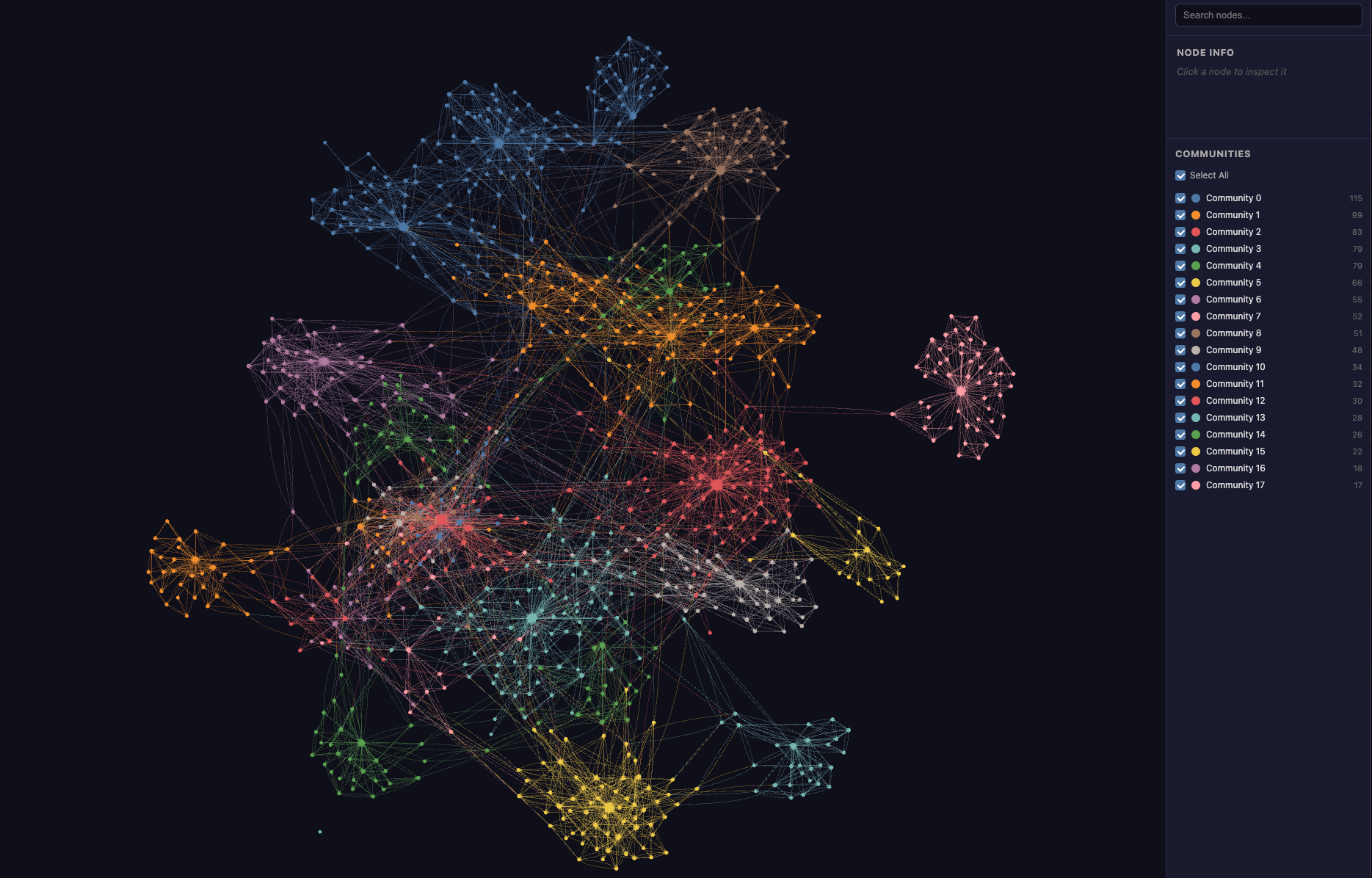
Graphify splits the graph into groups of notes that are more tightly linked to each other than to the rest. A few of the groups found in the marketing theme:
- A group of 53 notes around the Mom Test: customer conversations, compliments that are worth nothing, past facts rather than promises.
- A group of 52 notes on influence: Cialdini's six principles, reciprocity, perceptual contrast, the "because" that triggers compliance.
- A group of 46 notes on the chasm: the gap between early adopters and the pragmatic majority, the bowling pin strategy.
- A group of 26 notes on customer success: churn as a death spiral, the difference between customer success and support.
The report also identifies the most connected notes. The top ten are all reading maps: the one for Dunford's Obviously Awesome comes first with 180 links, ahead of Seth Godin's This is Marketing with 156.
Finally, it flags isolated notes. Just one out of 1,013: a note on the marketing persona that nothing connects to the rest. A hole in the wiki, found for free.
A note's connections
Ask Graphify to explain the glossary note on the chasm:
graphify explain "GLO00618-chasm"
It answers with its 30 connections, in both directions, and the relation for each. An excerpt:
| Direction | Linked note | Relation written in the note |
|---|---|---|
| ← | Crossing the Chasm reading map | the central gap in the model |
| → | Technology adoption life cycle | the framework the chasm sits within |
| → | Early adopters want a radical advantage, the majority an incremental improvement | explains the psychographic cause of the chasm |
| ← | Whole product | the chasm is partly caused by the lack of a whole product |
| ← | Bowling alley | begins after the chasm has been crossed |
| → | Moore's chasm separates early adopters from the mass market | same idea, from Seth Godin quoting Moore |
→: the chasm cites this note. ←: this note cites the chasm.
The last row is the most interesting. The chasm comes from Geoffrey Moore, but Seth Godin also discusses it in another book. The graph shows the two sources converging on the same idea.
The path between two distant ideas
What connects Cialdini's rule of reciprocity, a principle of social psychology, to churn in a subscription business?
graphify path \
  "ATO01269-la-regle-de-reciprocite..." \
  "ATO01404-dans-un-business-de-revenus-recurrents-le-churn..."
Graphify finds an 8-step path:
- The rule of reciprocity is universal and underpins human cooperation
- → the reading map for Influence (Cialdini)
- → Initial commitment changes self-image and produces automatic consistency
- → High risk builds trust; lowering your price erodes it
- → close to: a high price signals quality and supports trust → The price-quality effect makes a high price read as a signal of quality
- → the reading map for The Strategy and Tactics of Pricing (Nagle)
- → Switching costs reduce price sensitivity → converges: switching costs are a major retention lever → Retention is the most powerful growth multiplier
- → converges with the Customer Success thesis: churn destroys growth → In a recurring business, churn is a death spiral
The path tells a story: from the psychology of commitment to price as a signal of trust, then from switching costs to retention. Nobody wrote this line of reasoning in one go. It emerges from links laid down note after note, book after book.
What it adds over Obsidian's graph view
Obsidian's graph view draws the links. Graphify also:
- detects groups of notes automatically;
- names the relations, reusing the explanation written in the note;
- finds the shortest path between two notes;
- produces a report: central notes, isolated notes, unexpected connections;
- runs from the command line, so Claude can query it on its own while it works on the wiki.
The limits
Question-based search only reads titles. Graphify also has a free-text search command. It looks for the words of the question in the note names, not in their content, then widens to neighbouring notes. If the question does not use the words in the title, it finds nothing.
Groups follow books more than concepts. Positioning, for instance, is split across five groups, mostly by source book: Dunford on one side, Ries and Trout on the other. The per-book reading maps concentrate so many links that they shape the whole graph. The same effect shows up in paths: the one between the chasm and willingness to pay goes through three reading maps, which is accurate but not very instructive.
Groups are not named. Graphify can name them with an AI, but that would bring back the very cost I wanted to avoid. So they are called "Community 0", "Community 1"… and interpreting them is up to me.
Graphify is still a tool for code. On every build, it raises 12,884 warnings: the links have no "source file", a notion that only makes sense for code. It is harmless, but it is a reminder that the tool is being used outside its intended purpose.
The graph is only as good as the links. A link without an explanation becomes a silent "links" relation. A poorly linked note stays isolated. The graph fixes nothing; it only reveals.
Reproducing it yourself
You need a set of Markdown notes linked with [[...]] links:
- either an Obsidian vault that you link yourself;
- or a wiki maintained by an AI, like the one described in this article.
The script above assumes identifiers of the form ATO00001-slug and a folder tree organised by theme. You will need to adapt the link regular expression and the notes folder to your own setup.
Then, three commands:
pip install graphifyy

python build_graph.py --theme marketing --output _GRAPHITY/

graphify cluster-only _GRAPHITY/marketing/ --no-label \
  --graph _GRAPHITY/marketing/graph.json
The interactive map is then in _GRAPHITY/marketing/graphify-out/graph.html, with the report in GRAPH_REPORT.md next to it. The explain and path commands work directly on the graph.json file.
The AI had nothing to infer. All it took was reading what had already been written.