Originally written in French. Translated by AI — the meaning has been preserved, not the prose.
This topic is explored further in my book Le Contexte. To read it, download it or buy it on Amazon. The Amazon edition is available in French only; if you would like a version in another language, contact me.
This article follows on from "'Persist that': getting information out of ChatGPT and into permanent storage".
In that first hack, I had found something fairly simple that nonetheless changed a lot: ChatGPT could write a piece of information into Google Sheets, and so get it out of its own context window.
In other words, I could give it a persistent external memory.
At that point, Google Sheets was essentially serving as an outbox.
Then another question came up:
could that same mechanism be enough to run my system of Contexts directly inside ChatGPT?
Why I wanted to get the Context off the Mac
I have been using Contexts with Codex and Claude Code for a while now.
And when I say "Context", I do not mean a conversation history or somewhere to keep a few notes.
The definition I use is much broader:
A Context is a system bounded by a human mission, in which an AI organises and brings to bear what we know, where we know it from, how the pieces connect and where the work stands, so that the human can reach their goal without starting over. In doing so, the system builds up a lasting body of knowledge: what it produces stays available, grows over time, and can be reused for other goals.
I had already built an engine that made this principle work with Codex or Claude Code.
On my Mac, it works well.
From my phone, I had found a way round too: remote access to Codex running on the Mac.
But that has an obvious weakness.
It requires:
- the Mac to be switched on;
- it to stay connected to the internet;
- remote access to work.
At home, that is not much of a problem.
In the field, it is a much bigger one.
The case I had in mind was two trade shows coming up: leaving for a week with nothing but my phone, talking to exhibitors, gathering information, preparing interviews and possibly writing an article the same day.
I did not want to depend on a Mac switched on somewhere tens or hundreds of kilometres away.
So I asked myself whether I could take it out of the equation entirely.
The realisation: ChatGPT already had nearly everything
Looking at the problem differently, I saw that a Context engine ultimately needs three big building blocks.
- You need an engine that can reason over information.
- ChatGPT already does that.
- You need rules that tell the engine how to work.
- ChatGPT Project instructions can play that role.
- And finally you need a memory that survives conversations.
- That was the missing piece.
So my architecture could become:
Engine        → ChatGPT
Instructions  → ChatGPT Project
Persistence   → Google Sheets
The persistence hack from my previous article supplied exactly that third building block.
From there, porting my Context engine into ChatGPT became far less exotic.
I did not need to recreate a complete system around ChatGPT.
The AI engine was already there.
Mostly, I had to give it its rules and an external memory it knew how to read and modify.
How I ported the engine into ChatGPT
At first I tried putting all the engine's rules straight into the Project instructions.
That did not last long.
Project instructions are capped at roughly 8,000 characters, and my engine already needed a great deal more.
So I split the rules into two levels.
The first level is the CORE.
That is the part placed directly in the ChatGPT Project instructions.
It holds the absolutely essential pieces the engine needs to work:
- what a Context is;
- where it is stored;
- which commands exist;
- how to open a Context;
- how to persist a source;
- the file structure;
- the main invariants;
- the hierarchy of instructions.
The second level is an extended instruction.
It is far larger and lives in a Google Doc.
It holds, for example:
- the detailed ingestion method;
- the criteria for creating atomic knowledge;
- how state and synthesis are handled;
- decisions;
- contradictions;
- todos;
- reading strategies;
- production rules;
- error handling and edge cases.
The hierarchy becomes:
CORE
  ↓
Extended instruction
  ↓
Context-specific instructions
The CORE knows where the extended instruction lives and tells ChatGPT to load it at the start of a new conversation.
So the split is not there just to make the system more elegant.
It answers a very concrete constraint first: the whole engine does not fit in the instructions of a ChatGPT Project.
Google Sheets becomes the Context's memory
Next I had to represent the Context itself.
I could have used several Google Docs.
- One document for sources.
- Another for state.
- Another for knowledge.
- Another for tasks.
- ...
But I would quickly have ended up with a pile of files to track down and just as many identifiers to manage (more on that technical constraint later).
Google Sheets turned out to be far more practical.
One Context maps to one Spreadsheet.
Inside the Spreadsheet, each type of information has its own tab.
The structure I currently use:
00-FRAME
01-STATE
03-SESSIONS
04-ATOMIC
05-OUTPUTS
00-FRAME holds the mission and any Context-specific instructions.
01-STATE holds what you need in order to know where the work stands:
- state;
- synthesis;
- todo;
- decisions;
- contradictions;
- handoff.
03-SESSIONS holds the raw persisted sources.
04-ATOMIC holds the stabilised knowledge.
05-OUTPUTS holds the deliverables produced from the Context.
So Google Sheets is no longer just the place where ChatGPT writes something down to save it.
The Spreadsheet becomes the Context's complete structured memory.
Whatever you do, do not reload everything
That does not mean ChatGPT loads the entire Spreadsheet at every conversation.
That would probably be a very bad idea.
When I write:
Open My Context
ChatGPT starts by finding the matching Spreadsheet.
Then it loads only its core set:
- mission;
- instructions;
- state;
- synthesis;
- todo;
- decisions;
- contradictions;
- handoff.
The sources, the atomic knowledge and the older outputs stay in the Sheet.
ChatGPT goes and fetches them only when they become necessary.
That matters a lot in the way I think about the system.
Memory does not work like:
I put everything I know back into the prompt at every conversation.
It works more like:
I have an external memory where I can go and find the relevant information at the moment it becomes useful.
The Context becomes an addressable external memory.
The detail that was costing an enormous amount of time
In an early version, I had not yet optimised how Google identifiers were resolved.
Every time ChatGPT wanted to read from or write to a Context, it had to search for the matching Spreadsheet and then find its ID.
And at the next operation, it started again.
It worked, but some operations could take close to fifty seconds.
A large share of that time went into finding something that had already been found a few seconds earlier.
So I added a very simple rule.
Once the Context is open, ChatGPT keeps for the duration of the conversation:
Context name
→ Spreadsheet
→ Spreadsheet ID
Every subsequent operation uses that ID directly.
It is resolved again only if:
- you switch to another Context;
- the ID is no longer available;
- access fails.
It sounds obvious enough.
But it makes an enormous difference to how fluid the system feels.
Persisting is not learning
The engine itself ends up exposing very few commands.
Open <context>
Persist <content>
Todo <action>
Ingest
Save
Open loads a Context.
Persist keeps a new source.
Todo adds an action to carry out.
Ingest analyses the new sources and updates the structured knowledge (creating or enriching notes).
Save updates what is needed to pick the mission back up properly in a later conversation.
But the most important distinction in the system is probably this one:
Persist is not Ingest.
When I say:
Persist ...
I am not asking the engine to treat what I have just said as true.
All I am asking is:
keep this.
It becomes a source.
During ingestion, the engine can then work out that what it contains amounts to:
- a decision that was genuinely made;
- a task;
- a contradiction;
- something useful to the current state;
- knowledge stable enough to become an atomic note;
- or simply something to keep as a source and nothing more.
That avoids a drift I find particularly dangerous in memory systems for AI.
If everything the AI produces automatically becomes knowledge held by the system, the AI ends up able to use its own earlier output as evidence.
So I try to keep a strict separation:
source ≠ knowledge ≠ state ≠ synthesis ≠ deliverable
A source says:
here is what was said or observed.
Stabilised knowledge says something else:
here is what the system now treats as sufficiently established and reusable.
A Context in your pocket
It is on the phone that this port gets genuinely interesting for me.
I already do a great deal of my work by voice dictation.
And in this particular case, it completely changes my relationship with the system.
Take the trade show example again.
I arrive with a Context already prepared.
From my phone:
Open Show-X
I talk to a first exhibitor.
Walking away from the stand, I do not necessarily want to stop, open a notes app and type for five minutes on a tiny keyboard.
I walk on towards the next stand and simply dictate to ChatGPT what I have just learnt.
Then:
Persist <what I have just dictated>
That can take half a minute or so.
I carry on with my day.
After several conversations:
Ingest
The engine then starts structuring what I have gathered.
And this is where it becomes more interesting than a plain note-taking system.
I can ask ChatGPT:
What am I still missing to really understand this subject?
Or:
Which contradictions should I check with the next exhibitor?
Or again:
Which important questions have I not put to anyone yet?
I can get that answer while I am still at the show.
And so go and ask the missing questions there and then.
The cycle becomes:
conversation
   ↓
voice dictation while walking
   ↓
Persist
   ↓
Ingest
   ↓
look for the blind spots
   ↓
go back and ask questions
   ↓
fill in the Context
This is probably what changes my use of it the most.
The AI no longer comes in only after the gathering, to help me produce something.
It can come in during the gathering, while there is still a chance to improve the quality of the information.
Plaud: getting conversations into the Context
I also use a Plaud Note Pro.
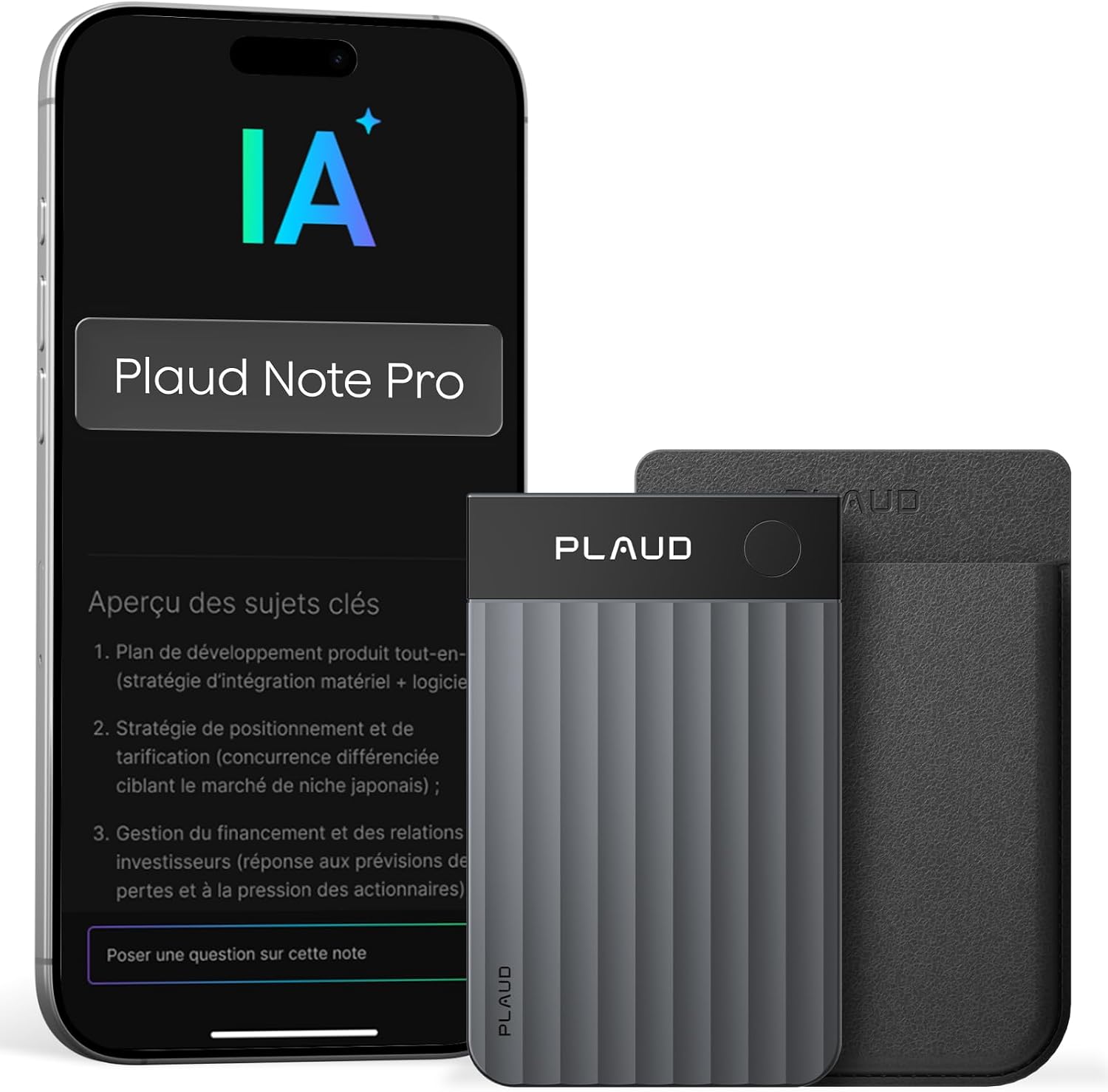
My Plaud Note Pro, which I can use to record conversations and interviews in the field.
The Plaud Note Pro is a small voice recorder you can use for meetings, conversations or interviews.
The recording is then available in Plaud and can be transcribed.
For my system, though, it is not Plaud's automatic summary that interests me most.
What I want is the full transcript.
And there is another important piece: ChatGPT can reach Plaud directly through its connector.
So from ChatGPT I can ask, for example:
List my last three Plaud recordings and tell me in one line what each of them is about.
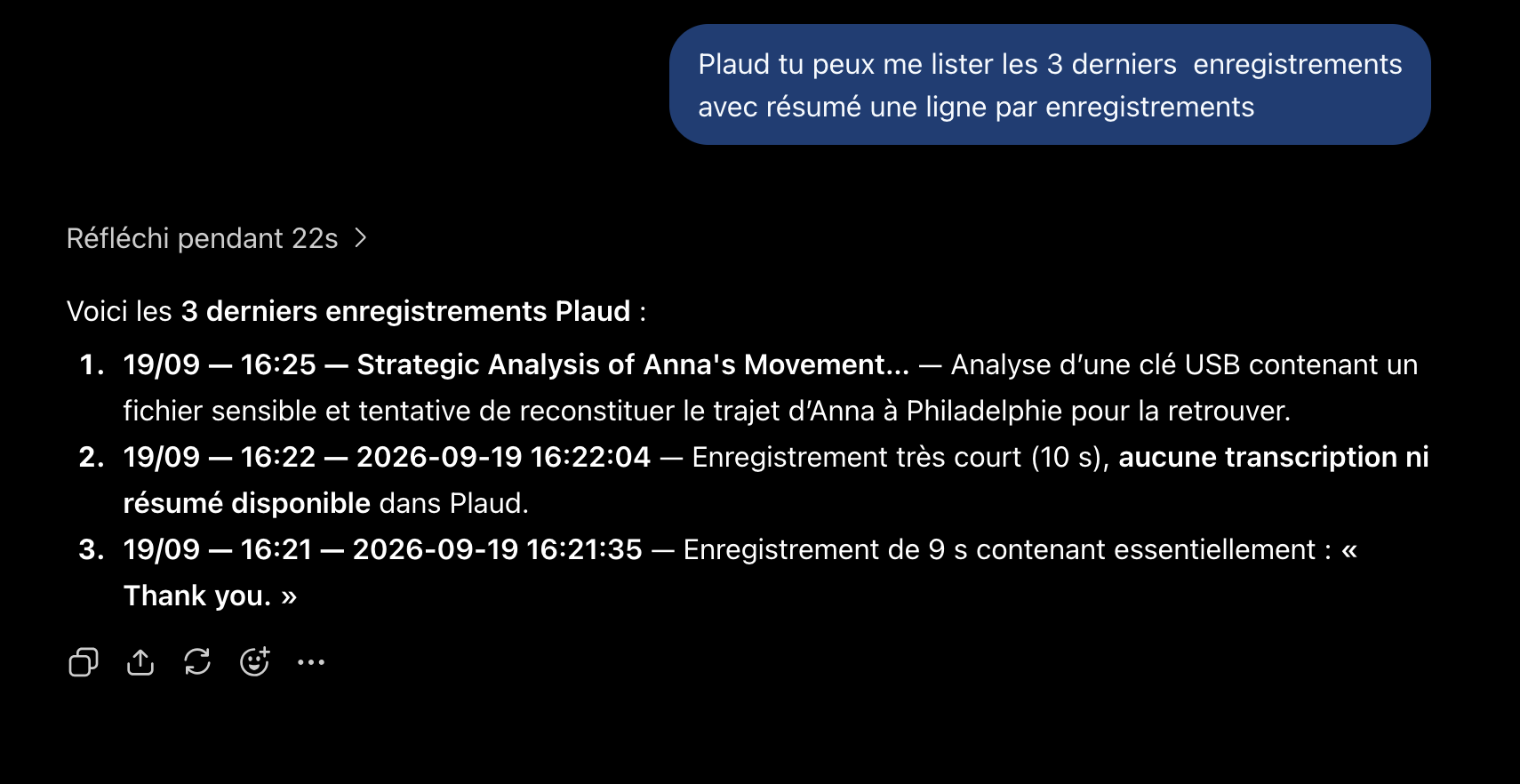
Querying Plaud from ChatGPT to find the latest recordings.
ChatGPT can find those recordings and then pull their transcripts directly.
That makes it possible to imagine a much more direct workflow:
real conversation
        ↓
Plaud
        ↓
transcript
        ↓
ChatGPT pulls the transcript directly
        ↓
Persist
        ↓
raw source in the Context
        ↓
Ingest
So I do not need to:
- download a file by hand;
- open the transcript;
- copy it;
- go back into ChatGPT;
- paste it.
I can do all of that automatically, by voice, from my phone.
And I would rather bring the full raw transcript into the Context than a summary.
A summary is already an interpretation.
A transcript stays much closer to the source.
Once the conversation is in the Context, I can ask:
- what has this person actually taught me?
- what contradicts the earlier conversations?
- which claims are worth checking?
- what should I ask the next person?
The building blocks this needs already work.
What I have not done yet is put the Plaud → ChatGPT → Context workflow through enough long days in the field, end to end, to say it is perfectly smooth.
So it is still a use case I need to test further.
How to reproduce the system
I have prepared two files matching the engine's two levels of instructions.
The CORE
The CORE is available here:
This is the part to copy into the ChatGPT Project instructions.
The extended instruction
The detailed instruction is available here:
It has to be copied into a Google Doc that ChatGPT can access.
Before you start, you obviously need to connect Google Drive to ChatGPT and let it access the documents the engine uses.
Setting the IDs
The CORE contains two identifiers:
DOCUMENT_ID = xxxx
FOLDER_ID = xxxx
DOCUMENT_ID is the Google Doc holding the extended instruction.
In a URL like:
https://docs.google.com/document/d/xxxx/edit
the xxxx part is the document identifier.
FOLDER_ID is the Google Drive folder where the Contexts will be stored.
For a URL like:
https://drive.google.com/drive/folders/xxxx
the identifier is again the xxxx part.
Everyone obviously has to replace these values with the ones from their own setup.
One Spreadsheet per Context
When a new Context is created, the engine creates a Spreadsheet containing:
00-FRAME
01-STATE
03-SESSIONS
04-ATOMIC
05-OUTPUTS
It is then placed in the folder defined by FOLDER_ID.
There is no need to copy the identifier of each of these Spreadsheets into the instructions by hand.
When I ask:
Open My Context
ChatGPT searches the Contexts folder for the matching Spreadsheet, gets its ID and then keeps it for the duration of the conversation.
At that point the system is up and running.
What this hack makes possible — and where it stops
This ChatGPT version does not replace the engine I use with Codex or Claude Code.
That was never the point.
It has several limits.
It is slower.
It is far less suited to Contexts that need Python scripts, API calls or a richer execution environment.
And above all, I still have little perspective on how it behaves when a Context really grows over several weeks.
So I see it as a complementary standalone mode.
On my Mac, Codex or Claude Code remain better suited to certain missions.
But from my phone, I can now use a Context without depending on my Mac being switched on and reachable.
And that was precisely the problem I wanted to solve.
There is also an amusing observation about the Codex quota.
Throughout this experiment in ChatGPT, the Codex quota shown did not go down.
Consumption observed:
0
I am obviously not claiming this amounts to a general rule about how OpenAI bills or counts this kind of use.
I am simply noting that, during this experiment, the hack did not eat into my Codex quota.
The system has already been used to produce this article
At the start, my first Google Sheets hack answered a fairly narrow question:
how do I get a piece of information out of ChatGPT and keep it for good?
A few days later, the question had become:
what if I got the whole structured memory of the Context out too?
That is what this system ends up doing.
ChatGPT no longer needs to "remember everything".
What it mainly needs to know is:
- where to look;
- what to load;
- what to persist;
- how to qualify information;
- how to find what has already been learnt;
- where the work stands.
The formula stays fairly simple:
ChatGPT reasons.
The instructions define the engine.
Google Sheets remembers.
And there is something rather satisfying about the fact that preparing and writing this article were themselves a test of the system the article describes.
To prepare this text, I used that Context in ChatGPT and nothing else.
I persisted my ideas into it.
I ingested them.
We identified blind spots.
I corrected some of the wording.
We created tasks and then finished them.
I added the missing pieces.
Then I produced a first version of the article, reread it, and used the same Context to prepare this V2.
In other words, the system has not just served as a technical demonstrator.
It has already been used to do the real work I built it for.
So the question is no longer really:
does it work?
It works.
The question that interests me now is more:
will this architecture still be this practical when the same Context is put through a full week of trade shows in the field?
That is what further use will show.