Originally written in French. Translated by AI — the meaning has been preserved, not the prose.
This article is about work I did more than thirty years ago. Between 1992 and 1995, under the name Malorean Effect and the handle volpone, I wrote demos for VGA PCs in Turbo Pascal and assembly. I recovered them, archived them and ported them to JavaScript so they run in a browser today. The original sources and the port are published in the MALOREAN_ARCHIVE repository. The demos can also be played online: Malorean Effect.
The Mathematica 1, 2, 3, 5 and 6 demos fit in a few dozen kilobytes, yet they run through hundreds of frames. None of them is a drawing: every image is a formula evaluated on every pixel, then colored by a palette. This article explains the mathematical principles involved, with excerpts of the original Pascal code so you can check them.
The images in this article are produced by the demos ported to JavaScript. The code excerpts come from the original sources.
Contents
- The setup: a 64,000-byte screen and a palette
- Eightfold symmetry: computing one eighth of the screen
- Integer arithmetic as a pattern generator
- Fixed-point fractals
- Products of polynomials: the quartics of MAT 5
- Functions of the plane: complex square root, rational function, sine
- Congruences
- Animating without recomputing: palette cycling
- 3D: rotations, cross product and hidden faces
- Why integers everywhere
- Where to find each idea
1. The setup: a 64,000-byte screen and a palette
The demos run in VGA mode 13h: 320 × 200 pixels, 256 colors. The screen is an array of $320 \times 200 = 64\thinspace 000$ bytes at address $A000:0000. Pixel $(x, y)$ is the byte at index
$$ i = 320\thinspace y + x $$
That byte is not a color but a color index. The palette (the video card's DAC) maps each of the 256 indices to a red-green-blue triplet coded on 6 bits (0 to 63). A demo therefore comes down to three things:
- a function $f(x, y, \dots)$ that gives an integer for every pixel;
- the reduction of that integer to one byte, that is, modulo 256;
- a palette (Volcano, Blue, … taken from Fractint 17.1, as the credits say).
$$ \text{color}(x, y) = f(x, y) \bmod 256 $$
In Pascal, the reduction is free: assigning a value to a Byte variable keeps only its 8 low-order bits.
cou := (f+g+g+g) and (1+f+f+g+c);   { cou is a Byte: result modulo 256 }
VGA[ofset+f] := cou;
Switching palettes changes the whole look of an image without changing a single pixel. That is the basis of animation by palette cycling (section 8).
2. Eightfold symmetry: computing one eighth of the screen
Almost every effect is drawn with eight axes of symmetry. Instead of computing $320 \times 200$ points, you compute a triangle and copy it.
The center of the screen is pixel $(160, 100)$. For a point $(f, g)$ with $0 \le f \le g \le 99$, the same color is written in eight places:
$$ (\pm f, \pm g) \quad\text{and}\quad (\pm g, \pm f) $$
This is the action of the symmetry group of the square (the dihedral group $D_4$, of order 8). The triangle $0 \le f \le g$ is a fundamental domain for it: it contains 5,050 points instead of $200 \times 200 = 40\thinspace 000$, roughly one eighth of the computation.
The code precomputes the memory offset of each row, so that every write costs only one addition:
For f:=0 to 199 do Mul1[f]:=( f+100)*320+160;   { row  +f }
For f:=0 to 199 do Mul2[f]:=(-f+100)*320+160;   { row  -f }

for f:=0 to 99 do for g:=f to 99 do begin
  cou := formule(f, g, c);
  V[Mul1[g]+f]:=cou;  V[Mul1[f]+g]:=cou;  V[Mul2[g]+f]:=cou;  V[Mul2[f]+g]:=cou;
  V[Mul2[g]-f]:=cou;  V[Mul2[f]-g]:=cou;  V[Mul1[g]-f]:=cou;  V[Mul1[f]-g]:=cou;
end;
The aesthetic consequence is immediate: any formula, even an asymmetric one, produces a rosette. It is evaluated in a single eighth, then reflected.
3. Integer arithmetic as a pattern generator
3.1 A ring $\mathbb{Z}/256$
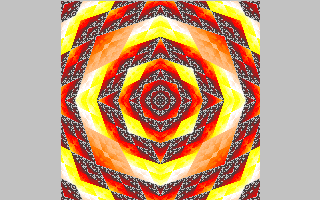
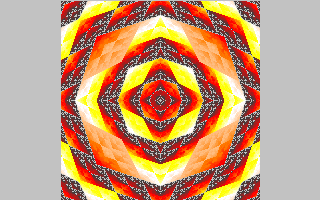
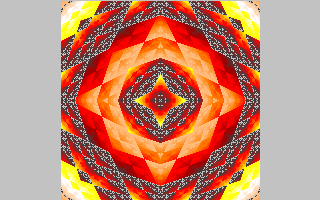
The formulas in STRANGE.DOC mix sums, products and bitwise operations (and, or, xor). For example, the formula in CARLE22.PAS:
$$ \text{cou}(f, g, c) = \bigl(f + 3g\bigr) \thickspace \And \thickspace \bigl(1 + 2f + g + c\bigr) \pmod{256} $$
Here $c$ is not a third spatial dimension: it is the frame number of the animation (from 0 to 1000). The three images below are the same formula at $c = 0$, $10$ and $100$.
| $c = 0$ | $c = 10$ | $c = 100$ |
|---|---|---|
 |
 |
 |
One property makes these computations work at any word width: for $+$, $-$, $\times$, and, or and xor, the 8 low-order bits of the result depend only on the 8 low-order bits of the operands. Computing in 16 bits (type Word) or in 32 bits therefore gives the same final color. That no longer holds for div and mod, which "see" the high-order bits: in those formulas, the 16-bit overflow is part of the result.
3.2 and and the Sierpiński triangle
The value $x \thinspace \And \thinspace y$ is zero exactly when $x$ and $y$ have no 1 bit in common. The set of integer points $(x, y)$ where $x \thinspace \And \thinspace y = 0$ draws the Sierpiński triangle. The reason lies in Pascal's triangle: the binomial coefficient $\binom{n}{k}$ is odd if and only if $k \thinspace \And \thinspace (n - k) = 0$ (Lucas's theorem). Coloring by x and y amounts to coloring Pascal's triangle by the parity of its entries.
A formula such as $(x+y+y) \thinspace \And \thinspace (1+x+x+y+z+z+z)$ thus layers a Sierpiński-like structure (the grainy areas in the images) over smooth bands coming from the linear terms.
3.3 The Pascal precedence trap
In Pascal, and has the same precedence as *, higher than +. In MAT6.PAS, Marc_3 computes:
cou := X*X and y*y;
This reads as $\bigl((X \cdot X) \thinspace \And \thinspace y\bigr) \cdot y$, not $(X^2) \thinspace \And \thinspace (y^2)$ as you would write it in C. Every formula in STRANGE.DOC was ported with this rule in mind.
4. Fixed-point fractals
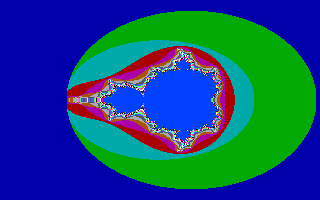
4.1 The Mandelbrot set
For a point $c = a + ib$, iterate $z_{n+1} = z_n^2 + c$ starting from $z_0 = 0$. Splitting the real and imaginary parts ($z = x + iy$):
$$ x' = x^2 - y^2 + a \qquad y' = 2xy + b $$
The color is the number of iterations before $|z|^2 = x^2 + y^2$ exceeds 4 (escape time), or the maximum iteration count if the point never escapes.
4.2 No floating point: the scale $S = 2048$
The program uses no real numbers. Each coordinate is multiplied by $S = 2048 = 2^{11}$ and stored in a LongInt: $X = S\thinspace x$, $Y = S\thinspace y$. The formulas become:
$$ X' = \frac{X^2 - Y^2}{S} + A \qquad Y' = \frac{XY}{S/2} + B $$
Check: $X^2 / S = S\thinspace x^2$ and $XY/(S/2) = 2S\thinspace xy$, which gives back $x^2 - y^2$ and $2xy$ at scale $S$. The program writes exactly that (DEMO_1.PAS, Courbe6):
Xp:=( (x*x-y*y)  div 2048 )+Px[Xe];
Y :=( (X*y)      div 1024 )+Py[Ye];     { 1024 = 2048/2, hence the factor 2 in 2xy }
X :=Xp;
module:=SQR(x)+sqr(y);                   { the test: module < 16000000 }
The escape threshold $|z|^2 \lt 4$ becomes $X^2 + Y^2 \lt (2S)^2 = 4S^2 = 16\thinspace 777\thinspace 216$. That is the constant 16777216 that shows up throughout DEMO_1.PAS.
The complex window is a rectangle $[A_{\min}, A_{\max}] \times [B_{\min}, B_{\max}]$, sampled at constant steps:
$$ a_i = A_{\min} + \frac{A_{\max} - A_{\min}}{320}\thinspace (i + 1), \qquad b_j = B_{\min} + \frac{B_{\max} - B_{\min}}{200}\thinspace (j + 1) $$
These values are rounded once and for all into two arrays (Px, Py): the inner loop no longer has any multiplication by the steps, nor any conversion.
4.3 Two savings
- Conjugation symmetry. The point $\bar c = a - ib$ has an orbit conjugate to that of $c$: the image is symmetric about the real axis. The loops run
For Ye:=0 to 100and write two rows,yeand199-ye. - Shifts. Dividing by $2048 = 2^{11}$ can be written
shr 11, faster than a division. Several curves use it (Courbe5,L15).
4.4 When 32-bit overflow becomes part of the image
Turbo Pascal LongInts are 32 bits with no overflow detection. With the usual escape measure $X^2 + Y^2$, overflow never happens: the loop stops as soon as $X^2 + Y^2 \ge 4S^2$, that is, for $|X|, |Y| \lt 4096$, and the next iteration gives at most $|X'| \approx 8192$, so $X'^2 \approx 6.7 \cdot 10^7 \ll 2^{31}$.
Several curves (Courbe2, EsFrac2, EsFrac5, Mandel10) nevertheless change the escape measure to $X^2 - 16\thinspace Y^2$. This measure can be negative, so the test module < 16777216 stays true even when the orbit escapes. $X$ then grows like $X^2/S$ at each step, exceeds $2^{31}$ within a handful of iterations, and the value wraps around in $\mathbb{Z}/2^{32}$. These images are no longer Mandelbrot fractals but patterns of arithmetic chaos, which the JavaScript port reproduces by enforcing the same 32-bit wraparound (Math.imul, |0). Courbe2, EsFrac2 and EsFrac5 also color the remaining points by x mod y.
5. Products of polynomials: the quartics of MAT 5
MAT5.PAS ("ideas on manipulating quartics") defines a second-degree function of $x$ and $y$:
$$ I_Q(x, y) = d_{2x}\thinspace x^2 + d_{2y}\thinspace y^2 + d_{1x}\thinspace x + d_{1y}\thinspace y + d_0 $$
The images are products of two or three such functions, divided by a large constant:
$$ \text{color}(x, y) = \Bigl\lfloor \frac{I_{Q_1}(x, y)\thickspace I_{Q_2}(x, y)}{10\thinspace 000} \Bigr\rfloor \bmod 256 $$
A curve $I_{Q_1} I_{Q_2} = \text{constant}$ is a product of two conics: it is a curve of degree 4, a quartic. The palette spreads this family of level curves into bands. Dividing by $10^4$, $3 \cdot 10^6$ or $10^7$ sets the density of the bands: the larger the constant, the wider apart they are.
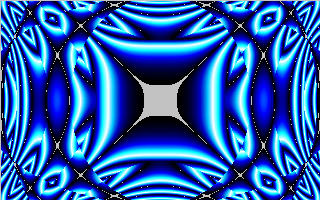
An arithmetic detail: the Image function computes in Integer (signed 16 bits), so its values wrap around at $\pm 32768$ before being multiplied in 32 bits. These overflows can cut the image into regions with sharp edges.
6. Functions of the plane: complex square root, rational function, sine
6.1 The complex square root
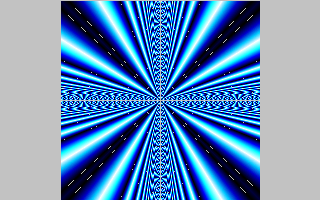
MAT3.PAS contains RAC_3 and RAC_4, which look like arbitrary formulas. They are in fact functions of the complex square root. For $z = x + iy$ and $\sqrt{z} = a + ib$:
$$ a^2 = \frac{|z| + x}{2}, \qquad b^2 = \frac{|z| - x}{2}, \qquad |z| = \sqrt{x^2 + y^2} $$
RAC_3: $20\sqrt{|z| - x} + 20\sqrt{|z| + x} = 20\sqrt{2}\thinspace (|a| + |b|)$. The image is made of the level curves of $|{\Re\sqrt z}| + |{\Im\sqrt z}|$.RAC_4: $100\thinspace \dfrac{|z| + x}{y}$. Since $y = 2ab$ and $|z| + x = 2a^2$, this ratio equals $100\thinspace \dfrac{a}{b}$, that is $100 \cot\dfrac{\theta}{2}$ where $\theta$ is the polar angle of $z$. The color depends only on the angle: the image is made of rays starting from the origin.
COU:=ROUND( 100*(SQRT(Xe*Xe+Ye*Ye)+Xe)/Ye ); { RAC_4: 100 cot(theta/2) }
6.2 A rational function: growing circles
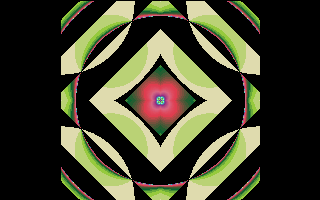
The Pasm procedure (flower directory) colors with
$$ \text{cou}(a, b, t) = \frac{2\thinspace (a + b)\thinspace t}{a^2 + b^2} $$
where $a$ and $b$ are the point's coordinates (scale from 1 to 301) and $t$ the frame number, from 1 to 300. The level curve $\text{cou} = k$ is
$$ \Bigl(a - \frac{t}{k}\Bigr)^2 + \Bigl(b - \frac{t}{k}\Bigr)^2 = 2\thinspace \frac{t^2}{k^2} $$
It is a circle through the origin, of radius $\sqrt2\thinspace t/k$. As $t$ increases, all the circles grow while staying tangent at the origin, hence the sense of expansion. Eightfold symmetry completes the drawing. In the code, $a^2 + b^2$ is stored in a Word: beyond 65,535 (that is, $a, b \gtrsim 181$), it wraps around and distorts the rational function at the edges of the figure.
6.3 Sines: one-variable tables
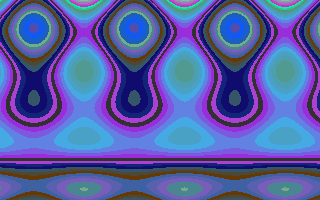
The ES2, ES3, … effects use trigonometric functions, for example ES2:
$$ \text{cou}(x, y) = \operatorname{round}\bigl((x + y)\thinspace \sin x\bigr), \qquad x, y \in [-10, 10] $$
Computing $\sin x$ over $64\thinspace 000$ pixels would be slow on the processors of the time, and Pascal Reals (6 bytes) are emulated when there is no coprocessor. The trick lies in separability: $\sin x$ depends only on the column. The program precomputes two arrays, SinX[320] and CosY[200], that is 520 calls to Sin and Cos instead of $64\thinspace 000$:
For xe:=0 to 319 do SinX[xe]:=Sin(Px[xe]);
...
Cou:=Round((PartieB+Py[Ye])*PartieA);      { PartieA = SinX[Xe], PartieB = Px[Xe] }
6.4 Triangular numbers
In Moy_3 and Moy_4, the SOMME array holds the triangular numbers:
$$ S_n = \sum_{k=1}^{n} k = \frac{n(n+1)}{2}, \qquad \text{cou} = S_{x+y} + S_{x+t} $$
Here again, the table replaces a computation: the sum is computed once, then read.
7. Congruences
The CONG1, CONG2, … procedures ("Cong part, code by Volpone, 1993") color each point with a result from modular arithmetic:
ca:=1;
repeat  inc(ca);  until (g mod ca = f) or (ca = 250);
cou:=ca;
The condition $g \bmod ca = f$ means that $ca$ divides $g - f$ and is strictly greater than $f$. The color is therefore
$$ \text{color}(f, g) = \min\bigl\lbrace \thinspace d \ge 2 \thickspace :\thickspace d \mid (g - f),\thickspace d \gt f \thinspace \bigr\rbrace \quad (\text{capped at } 250) $$
It is the smallest divisor of $g - f$ greater than $f$. In the edge case $f = 0$ (which CONG1 does not draw, since it starts at $f = 1$), it is simply the smallest prime factor of $g$. These images are therefore divisor maps: the smallest admissible divisor changes abruptly when you cross a multiple, which explains the triangular blocks in the figure.
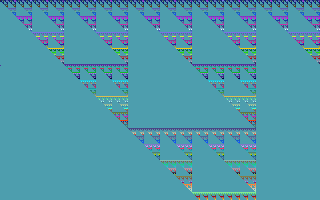
Other CONG procedures replace the condition with variants: (f xor g) = ca, (f and g) = ca, (f - g) = (ca xor g), and so on.
8. Animating without recomputing: palette cycling
Recomputing 64,000 pixels for every frame is slow. The MAT_2 and MAT_6 demos animate in two ways.
- Recomputation, with a time parameter: frame $c$ is computed, then displayed (as in
Strange, section 3). - Palette cycling: the pixels do not move. The palette entries are cycled (color $i$ takes the triplet of color $i - 1$), so the bands seem to scroll.
$$ \text{pal}'[1] = \text{pal}[255], \qquad \text{pal}'[i] = \text{pal}[i-1] \quad (2 \le i \le 255) $$
Entry 0 (the background) stays fixed. The cost of one frame is rewriting $256 \times 3 = 768$ bytes into the DAC (ports 3C8h/3C9h), against $64\thinspace 000$ for the screen: 83 times less.
PalInter:=Pal1;
For F:=1 To 255 Do Pal1[f]:=PalInter[f-1];
Pal1[1]:=PalInter[255];
{ then write the 256 triplets to the DAC, and wait NbPulse ticks }
The pace is set by the BIOS counter at address $0040:$006C, incremented by the motherboard clock at
$$ \frac{1\thinspace 193\thinspace 182}{65\thinspace 536} \approx 18.2 \text{ Hz} $$
In MAT6.PAS, the end of the animation speeds up: it goes from one cycling step per tick to two, then three, then five, making the colors scroll faster and faster without touching the pixels.
9. 3D: rotations, cross product and hidden faces
MATH1.DOC gathers the tools for wireframe 3D.
9.1 Dot and cross products
$$ U \cdot V = U_x V_x + U_y V_y + U_z V_z $$
$$ U \wedge V = \begin{pmatrix} U_y V_z - V_y U_z \cr U_z V_x - V_z U_x \cr U_x V_y - V_x U_y \end{pmatrix} $$
9.2 Elementary rotations
The matrices are written for row vectors ($P' = P\thinspace R$), the 1990s convention:
$$ R_x = \begin{pmatrix} 1 & 0 & 0 \cr 0 & \cos x & \sin x \cr 0 & -\sin x & \cos x \end{pmatrix} \quad R_y = \begin{pmatrix} \cos y & 0 & -\sin y \cr 0 & 1 & 0 \cr \sin y & 0 & \cos y \end{pmatrix} \quad R_z = \begin{pmatrix} \cos z & \sin z & 0 \cr -\sin z & \cos z & 0 \cr 0 & 0 & 1 \end{pmatrix} $$
They are the transposes of the "column" matrices found in today's textbooks. In the web demo, an arbitrary rotation is the product $R = R_x R_y R_z$: each vertex $P$ of the cube is transformed into $P' = P R$.
9.3 Projection
MATH1.DOC does not give the projection; the web demo uses classic perspective. A point $(x, y, z)$ in front of the viewer projects onto the screen at
$$ x_{\text{screen}} = 160 + F\thinspace \frac{x}{z}, \qquad y_{\text{screen}} = 100 - F\thinspace \frac{y}{z} $$
where $F$ is the focal length (the perspective factor). The larger $z$, the smaller the object.
9.4 Hidden faces
For a convex solid, a face is visible only if it faces away from the object and toward the viewer. MATH1.DOC gives the method in four lines:
- compute the face's normal $N$ (as the cross product of two of its edges, pointing outward from the solid);
- compute the view vector $V$ from the face to the viewer;
- compute $V \cdot N$;
- if $V \cdot N \gt 0$, the face is visible.
$$ N = (B - A) \wedge (C - A), \qquad \text{visible} \iff V \cdot N \gt 0 $$
The sign of the dot product is the sign of the cosine of the angle between the two vectors: positive if the angle is acute, that is, if the face "looks" toward the viewer. The test discards roughly half the faces in one go, with no sorting and no intersection computations.
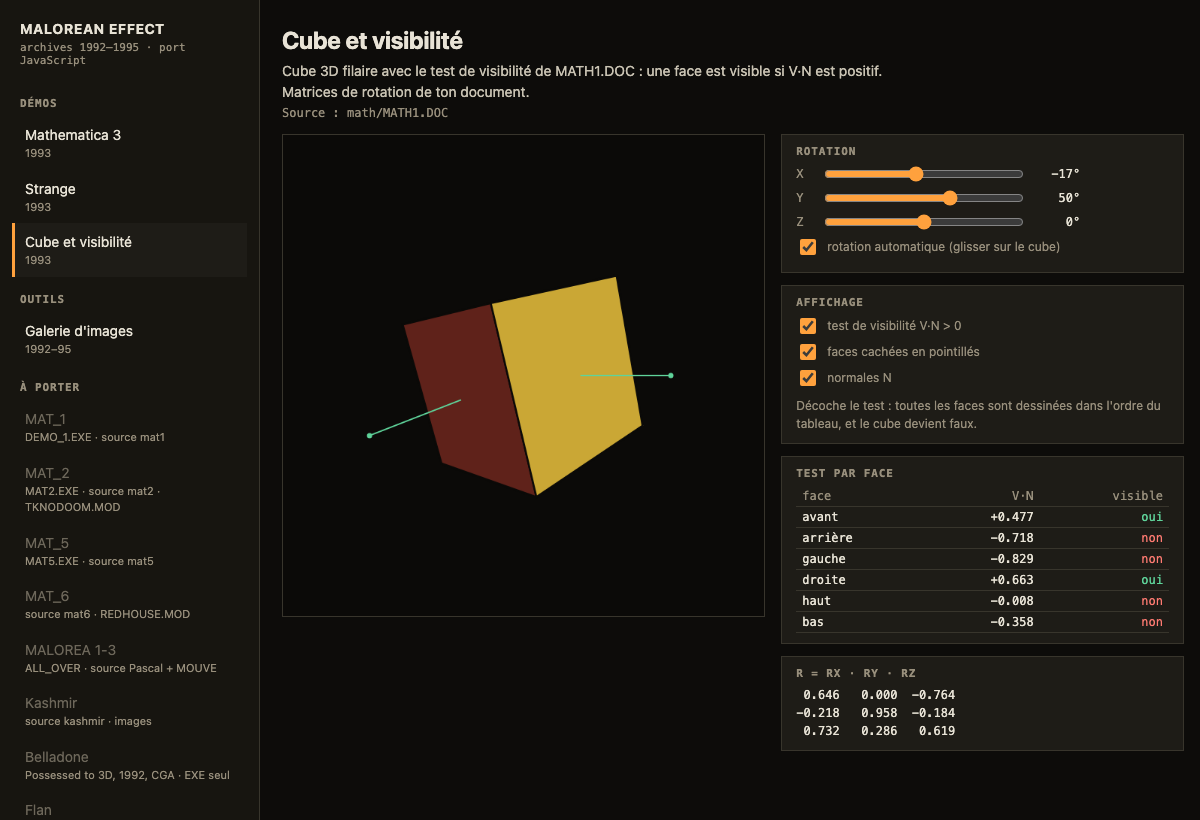
The Cube et visibilité (Cube and visibility) web demo displays the value of $V \cdot N$ for each face; uncheck the test and the back faces appear, and the cube no longer renders correctly.
10. Why integers everywhere
Almost every formula is in integers, with precomputed tables. Several clues in the sources explain why:
- The program headers (
MALOREA1.PAS) request{$G+}(80286 instructions) and{$N-}(no 8087 coprocessor). Without a coprocessor, aRealis emulated in software: very slow. - Tables are everywhere:
Mul320[y] = 320 y(saves one multiplication per pixel),CARRE[n] = n²,SinX,CosY,SOMME. - Divisions by powers of 2 become shifts (
shr 11), and factors of 2 are folded into the constants (div 1024for $2xy$). - Eightfold symmetry divides the work by eight.
- Palette cycling (section 8) avoids touching the screen.
The same reasoning explains the shape of the procedures: one loop over $f$, one over $g \ge f$, a single formula, eight writes. That is what made animation possible with the computing power of the time.
11. Where to find each idea
Everything is in the MALOREAN_ARCHIVE repository, in the MALOREAN_EFFECT/ folder.
| Idea | Original source | Web demo |
|---|---|---|
| Eightfold symmetry, integer formulas | CODE hors demo/STRANGE/CARLE*.PAS |
Strange |
| Fixed-point fractals | DEMO/MAT_1/code/SOURCE/DEMO_1.PAS |
Mathematica 1 |
| Carle, Rotate, ExPoly, Cong, Es effects | DEMO/MAT_2/code/SOURCE/DEM2.PAS |
Mathematica 2 |
| Complex square root, rational function, triangular numbers, polynomials | DEMO/MAT_3/code/MAT3.PAS |
Mathematica 3 |
| Quartics | DEMO/MAT_5/code/MAT5.PAS |
Mathematica 5 |
Marc formulas, palette cycling |
DEMO/MAT_6/code/MAT6.PAS |
Mathematica 6 |
| Dot and cross products, rotations, hidden faces | math/MATH1.DOC |
Cube et visibilité |
The original sources are in ORIGINAL/. The web port is in PORTAGE_JS/: its home page lists the demos on the left, the speed is adjustable, and each scene's description names the original Pascal procedure.